RTCU IEX
Investigate application execution on the physical device, from development-time debugging to analysis of field issues.
See the workspace.
Live data and execution control
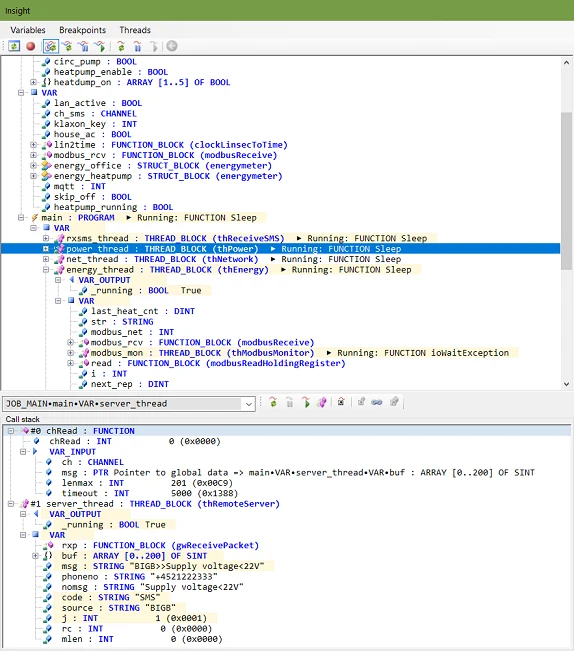
Use Insight! to examine a running application and interact with its execution.
- View live data and edit global variables without recompiling.
- Pause and resume threads, and inspect call stacks.
- Use coded breakpoints and integrated breakpoint management.
- Work from within the M2M Studio or classic RTCU IDE workflow.
Monitor and simulate device interfaces
Available interfaces depend on the device and runtime. Check the requirements for your installation.
- I/O and control: digital inputs, digital outputs, switches and LEDs.
- Communication: dual CAN channels, cellular, WLAN and serial ports, including RS232/RS485.
- Connectivity: network status, access points, USB host and SMS messaging.
- System resources: GNSS positioning, power supplies and integrated sensor data.
Investigate hardware interaction
Virtualization features include digital and analog I/O, power, CAN, GNSS, RS232/RS485, Modbus, SMS and network states. Monitoring also covers cellular, WLAN, Communication Hub, access-point and USB-host information.
Use the IEX manual and matching release history for the installed software. A PC Simulator session and IEX execution on a physical device serve different parts of the development workflow.
Documentation & downloads
Use the component documentation and published versions for your installation.
Download packages directly from the catalogue. Read the Software & Firmware License (PDF).