RTCU Emulator
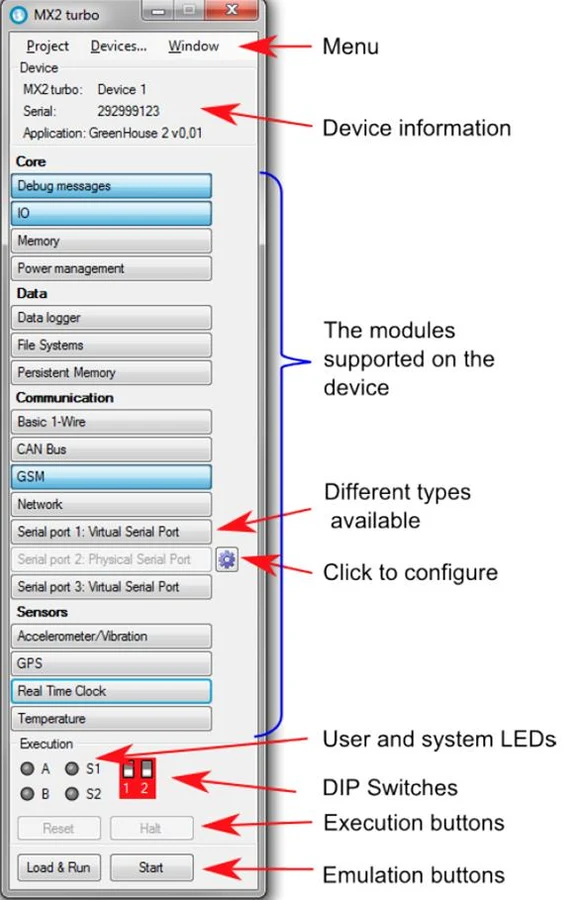
Test and debug applications for supported X32 and NX32 systems in a Windows-based environment without a physical RTCU device.
See the workspace.
Validate without a physical device
The Windows-based Emulator provides an environment for testing and debugging RTCU applications independently of physical hardware. Use the RTCU Emulator data sheet and user manual to establish the supported device and emulation features.
Keep X32, NX32 and NX32L distinct
The Emulator supports X32 and NX32 architectures. It does not support NX32L.
For NX32L development, M2M Studio provides a built-in PC Simulator, while RTCU IEX investigates execution on the actual device. Choose the workflow that matches the application and target hardware.
Version requirements
Emulator V1.60 was released on 26 August 2019 and is based on firmware V5.06. Check the supported firmware version before using it with an existing project.
Consult the release history for version-specific changes and requirements.
Documentation & downloads
Use the component documentation and published versions for your installation.
Download packages directly from the catalogue. Read the Software & Firmware License (PDF).